Teaching a Drone to Dodge: My Summer at Tron Future
Walking In on Day One
When I started at Tron Future for the summer, I knew Python and I knew my way around VS Code. That was about it. I hadn't touched ROS, Docker, or Linux in any serious capacity. The assignment was clear though: build a navigation system that could guide a drone through an obstacle field autonomously.
That meant I had to learn an entire new software stack from scratch, figure out how simulated drones actually work, and then write path planning algorithms that wouldn't crash the thing into a wall. All in one summer.
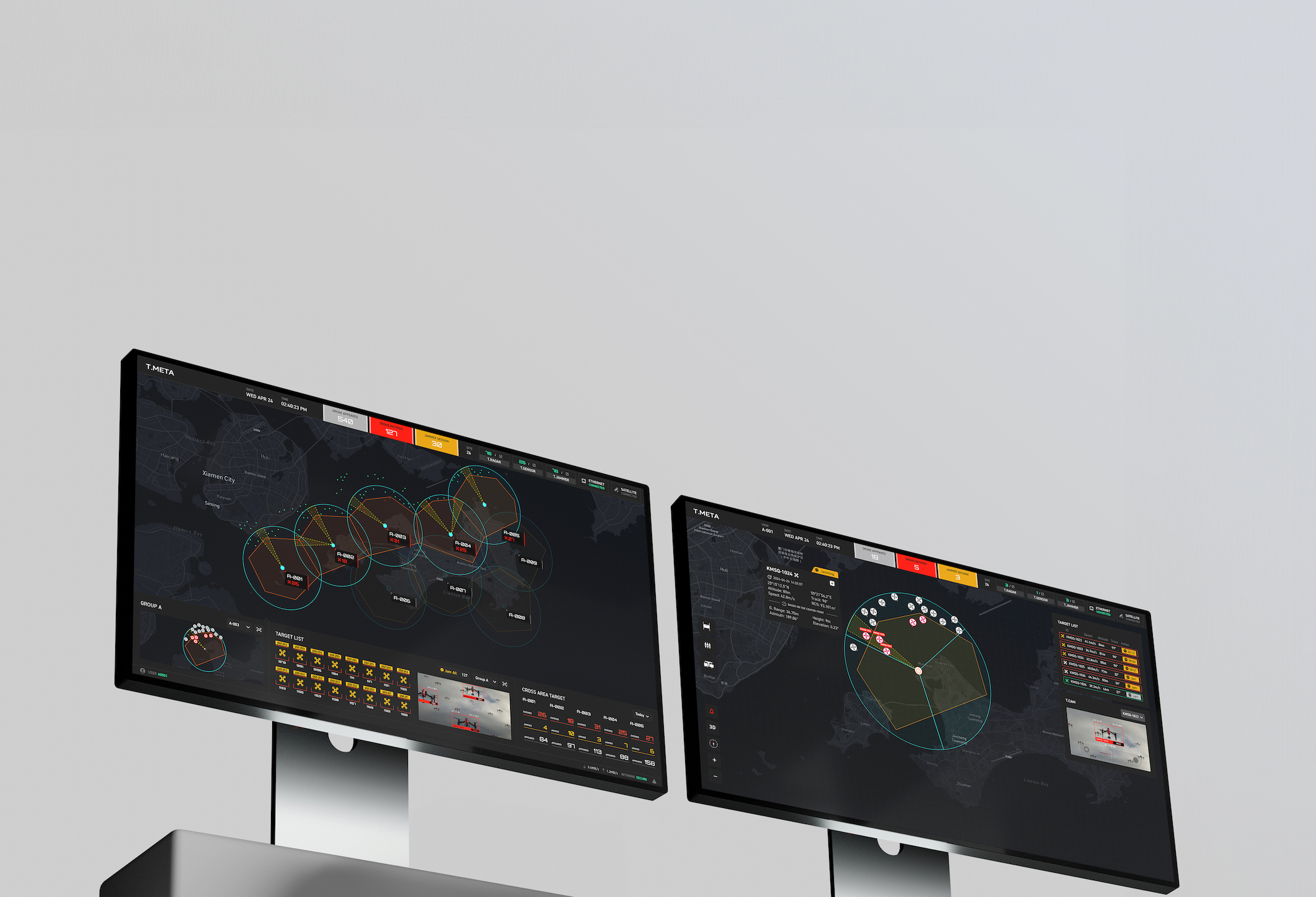
Looking back, the learning curve was steep but the pacing made sense. Each week built on the last. By the end I had a working pipeline where a simulated drone could take off, generate a path around obstacles, and fly it. Not bad for someone who didn't know what a ROS topic was three months earlier.
The Stack I Had to Learn
The first few weeks were mostly about getting comfortable with professional development tools. At school, I'd write Python scripts in VS Code and run them locally. At Tron Future, everything ran inside Docker containers on Linux, with code managed through GitLab and drone communication handled through ROS2.
ROS2
The communication backbone. Subscriber and publisher nodes let different parts of the system talk to each other through topics. This is how our code received telemetry from the PX4 flight controller and sent commands back.
Gazebo
The simulation environment. I built and edited 3D worlds, attached sensors like lidar to the drone model, and tested flight paths without risking real hardware. Also a great crash course in navigating Ubuntu.
Docker
Everything ran in containers so the environment was reproducible across machines. No more "it works on my computer" problems. Setting up the container configs was tedious at first but saved countless hours later.
GitLab
Version control for the whole team. Coming from solo projects where I'd just save files locally, learning proper branching and merge request workflows was a shift in mindset.
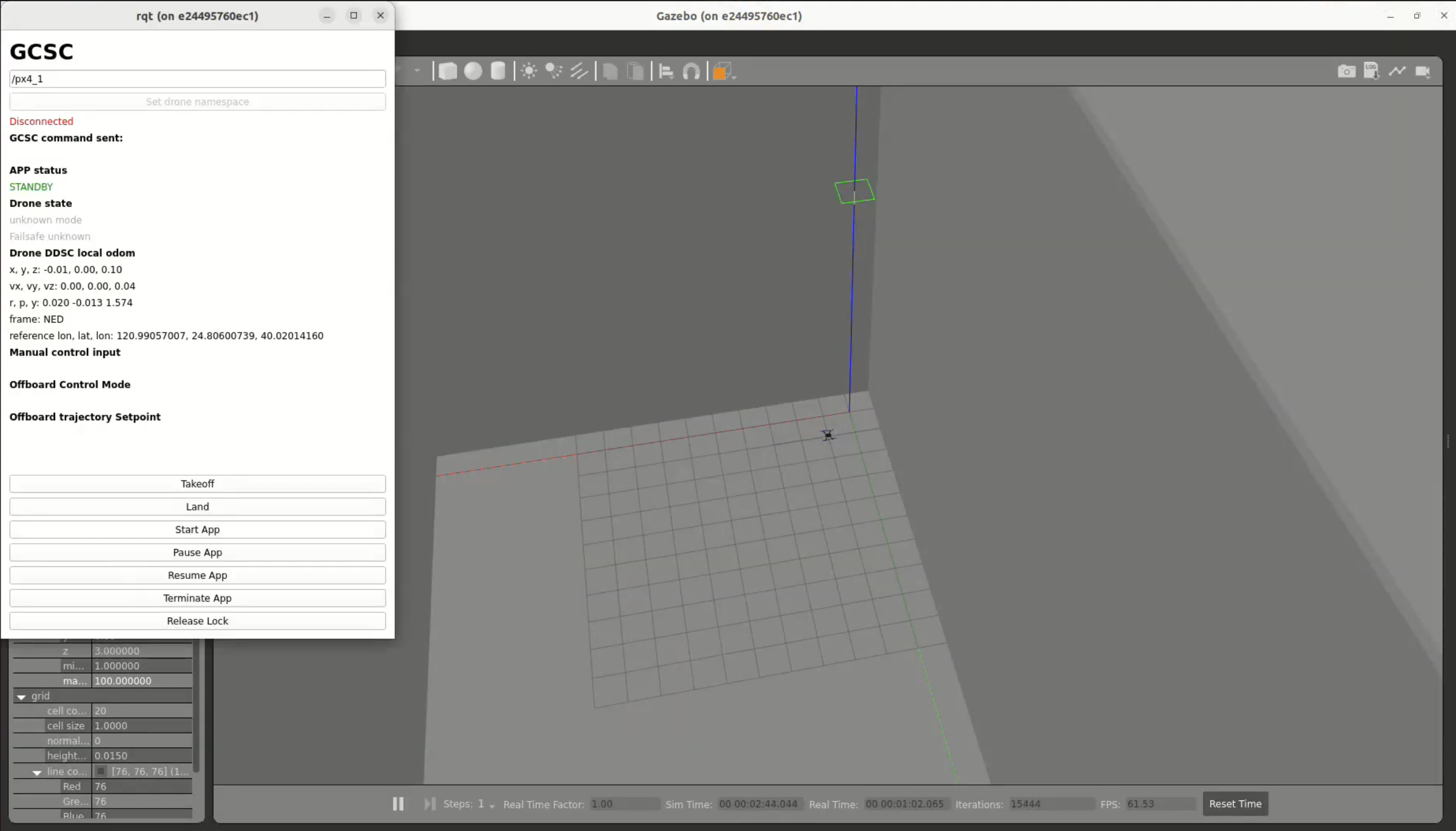
Getting all of these tools to play nice together was honestly one of the harder parts of the internship. It's one thing to learn each tool in isolation. It's another to debug a ROS2 node running inside a Docker container on Ubuntu when you barely know any of those three things yet. But that's how you learn, by being uncomfortable and pushing through it.
Naive Path Planning
My first crack at navigation was the most intuitive approach I could think of. I wrote a bunch of loops and if-statements that tried to steer the drone around obstacles based on hardcoded rules. If something is to the left, go right. If something is above, go under. That kind of logic.
It worked for very simple cases. One obstacle, straight path, nothing weird. But the moment the environment got any more complex, the edge cases piled up fast. What if there are two obstacles side by side? What if the drone has to backtrack? What if the only path requires going away from the goal first?
The rules-based approach just couldn't handle it. Every fix for one edge case would create two more. I needed something fundamentally different, something based on math rather than my intuition about which direction to turn.
A* vs. Potential Fields
Once the naive method fell apart, I started researching proper path planning algorithms and landed on two strong candidates: A* and potential field navigation. The requirements from the team were a bit ambiguous about whether the drone would have full map knowledge at runtime or not, so rather than guess, I explored both.
A* is a graph-based search algorithm. You divide the environment into a grid, treat each cell as a node, and the algorithm finds the shortest obstacle-free path from start to goal. It's thorough and guaranteed to find a solution if one exists. I implemented it and it worked well for open environments with scattered obstacles.
But A* has a key assumption baked in: it needs to know the full map before the drone takes off. Every obstacle, every boundary, all of it has to be defined upfront. If you have that information, A* is great. If you don't, it can't help you. It also produces grid-aligned paths with jagged staircase-like turns that need smoothing before a drone can realistically fly them.
On top of that, A* wasn't as strong at solving maze-like obstacle layouts as I expected. In tight corridor environments where the path had to weave through narrow gaps, the grid discretization meant the resolution of the path was only as good as the grid cell size. Making the grid finer improved the paths but made computation significantly slower.
Potential field navigation took a completely different approach. Instead of planning a full route upfront, it reacts in real time to whatever the drone can sense around it. No map required. I ended up focusing most of my effort on this method because it felt like the more flexible solution given the ambiguity around the drone's operating conditions. If the drone would have map knowledge, great, A* works. If it wouldn't, I needed something that could fly blind, and potential fields could do that.
Potential Field Path Planning
The method that actually worked was called potential field path planning, and the concept is surprisingly elegant once you see it.
Imagine the goal is a magnet pulling the drone toward it. That's the attractive field. Now imagine every obstacle is another magnet, but this one pushes the drone away. That's the repulsive field. At any point in space, you combine these forces into a single vector that tells the drone which direction to move. Follow the vectors, and you get a smooth path that naturally curves around obstacles.
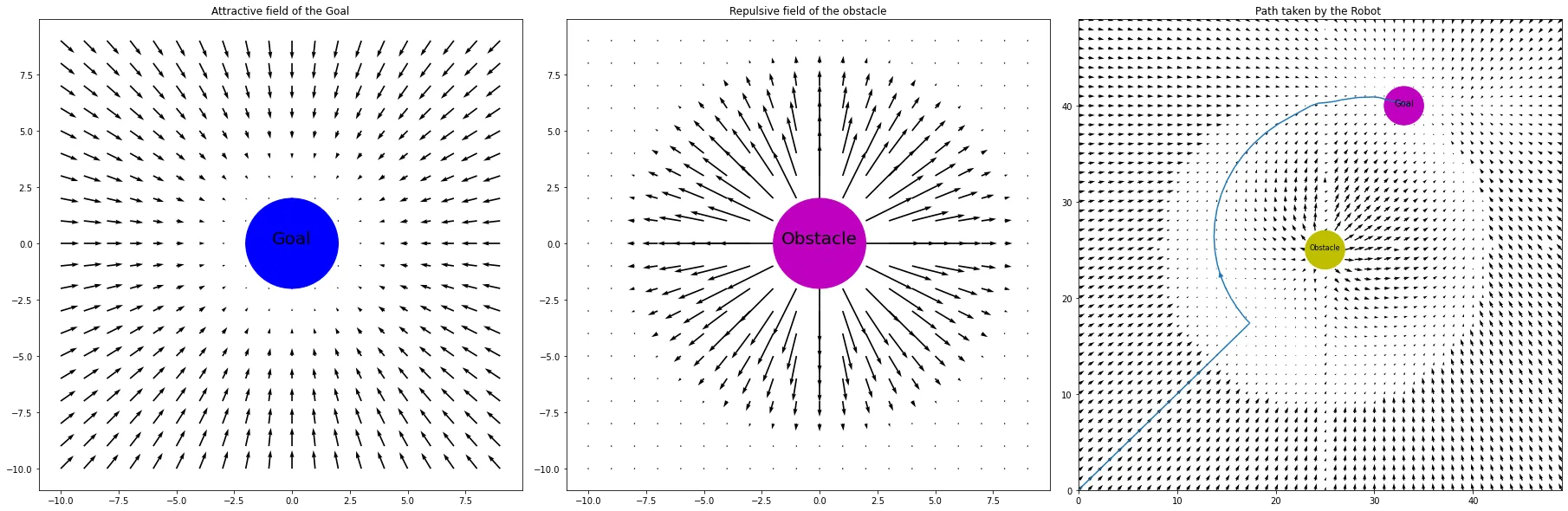
The math boils down to computing the distance d between the drone and each obstacle, finding the angle θ between them, and then setting velocity deltas based on which zone the drone falls in. If it's too close (within radius r), max repulsion. If it's in the buffer zone, scaled repulsion. If it's far enough away, ignore it entirely.
The algorithm generates a set of waypoints from origin to goal, scaled to the coordinate system of the simulation. Those waypoints get fed back into PX4, and the drone follows them. The whole thing runs in real time.
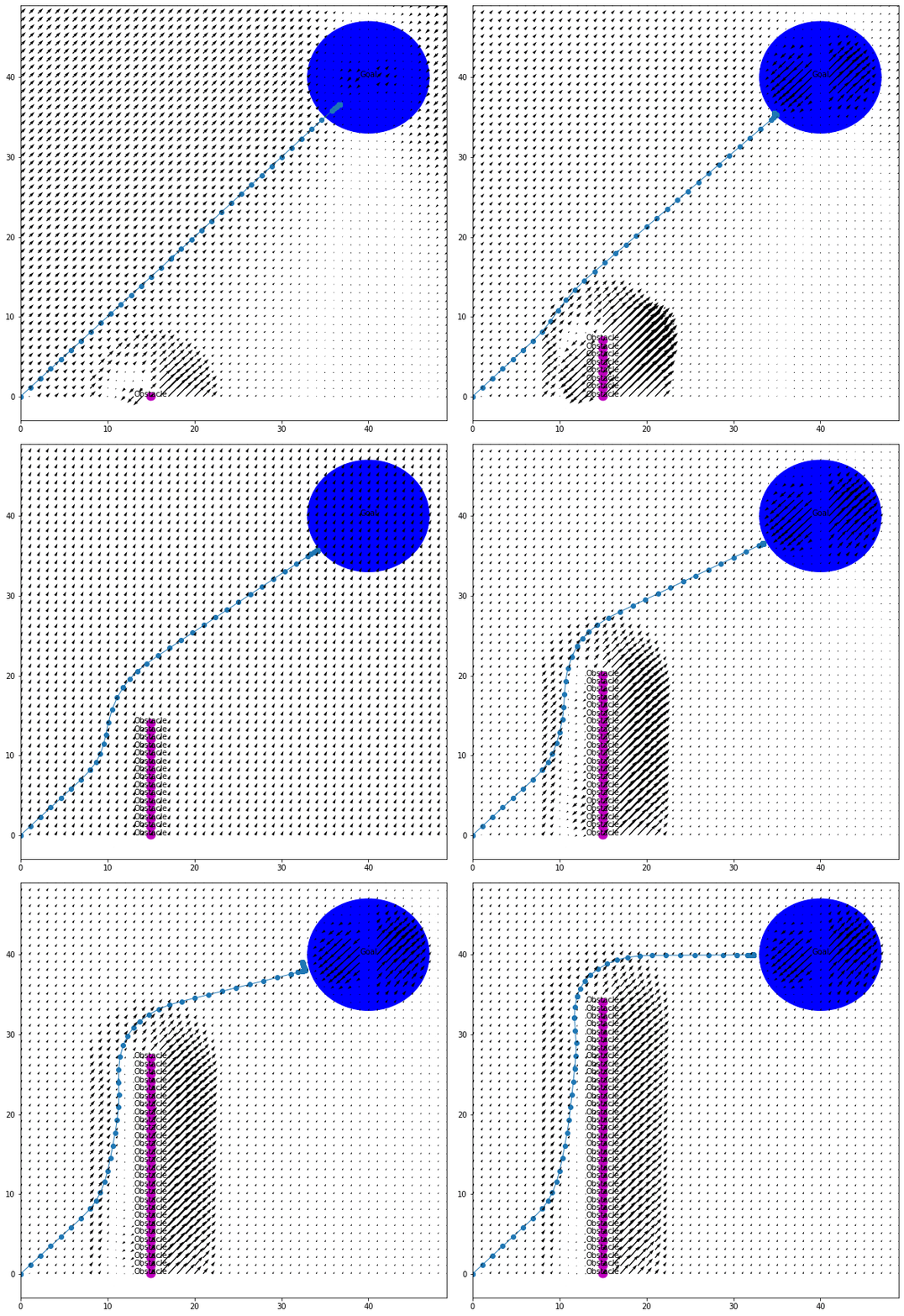
How it works in practice: The potential field algorithm generates waypoints from (0, 0) to (50, 50), scaled to the goal's actual coordinates. Obstacle positions are set manually, and the resulting path is fed into PX4 so the drone can navigate the obstacle field autonomously.
Where Potential Fields Break Down
Potential fields are elegant, but they're not perfect. I ran into two main issues that are actually well-documented problems with this approach.
The first was right angles. When the repulsive vector from an obstacle points in the exact opposite direction as the attractive vector from the goal, they cancel out and the drone gets stuck or makes a sharp 90-degree turn. It's like two people pulling you in exactly opposite directions. You don't move. A potential fix is adding a small bias to the repulsive vectors, either randomly or biased toward whichever side has fewer obstacles, to break the symmetry.
The second was maze-like environments. Potential fields are a local method, meaning the drone only "sees" the forces acting on it right now. It has no memory of the bigger picture. So if obstacles form a U-shape or a dead end, the drone can get trapped. It doesn't know to back up and go around because it has no concept of the global layout.
This is actually where A* shines. Because A* sees the entire map, it never gets trapped in dead ends or confused by U-shaped obstacles. It can plan a route that temporarily moves away from the goal if that's what the path requires. Potential fields can't do that.
The tradeoff became really clear by the end of the internship. A* is the better global planner but needs full map knowledge and produces rigid grid paths. Potential fields are the better local planner but are blind to the big picture and can get stuck. Neither one alone is the complete solution.
The plan going forward: The natural next step is to combine both methods into a layered architecture. A* would handle the global route, computing a high-level path through the full map from start to goal. Potential fields would handle local, real-time adjustments, reacting to obstacles as the drone encounters them along that route. This is actually the standard approach in most production autonomous navigation systems, and it's what I'd build out given more time.
What the Internship Taught Me
The obvious takeaway is the technical stuff. I came in knowing Python and left knowing ROS2, Docker, Gazebo, GitLab, and Linux. I learned how to read documentation for tools that don't have great documentation. I learned how to debug systems where the problem could be in any one of five different layers.
But the less obvious takeaway was about how software gets built in the real world. At school, you write code that works once for a homework submission and then you never touch it again. At Tron Future, I wrote code that other people had to read, run, and build on top of. That changes how you think about everything, from variable names to error handling to how you structure your commits.
Weeks 1-2: Environment Setup
Installed and configured Docker, ROS2, Gazebo, and PX4. Got the basic simulation running and learned to fly the drone manually through QGroundControl.
Weeks 3-4: ROS2 Fundamentals
Built subscriber and publisher nodes. Learned how topics work. Got the drone responding to code-generated commands instead of manual input.
Weeks 5-6: Path Planning Research
Wrote the first rules-based obstacle avoidance, which failed past simple scenarios. Began researching A* and potential field methods. Implemented A* grid-based pathfinding.
Weeks 7-8: Potential Fields
Decided to focus on potential field navigation for its flexibility without map knowledge. Implemented the algorithm with lidar integration. Got real-time waypoint generation working.
Weeks 9-10: Testing and Comparison
Stress-tested both approaches with complex obstacle layouts. Documented strengths and limitations of each. Identified the combined A* + potential field architecture as the ideal next step.
I also gained a much deeper appreciation for the gap between "it works in simulation" and "it works in the real world." Everything I built ran in Gazebo. Making it work on a physical drone introduces a whole new set of problems: sensor noise, latency, wind, battery life, GPS drift. Simulation is a starting point, not the finish line.
Looking Back
If someone had told me in April that by August I'd be writing path planning algorithms for autonomous drones, I would have thought they were exaggerating. The internship compressed what would normally be a semester or two of learning into ten weeks, and the pressure of working on a real project with real deadlines made everything stick in a way that coursework doesn't always manage to.
The biggest shift for me was going from thinking of myself as a mechanical engineering student who can code, to someone who's genuinely comfortable at the intersection of hardware and software. ROS2 is that intersection in a very literal way. It's the layer where physical systems meet digital control, and spending a summer living in that layer changed how I think about engineering problems.
I'm grateful to Tron Future for giving me the space to figure things out at my own pace while still pushing me to deliver. It was the right kind of challenge at the right time.